Tuesday, September 22, 2020

Red Hat Remote Exam Preparation

 EVERYTHING THAT YOU SHOULD KNOW ABOUT RED HAT’S NEW REMOTE EXAMS

System Requirements

Computer:​ You will need a computer with a single active monitor. Red Hat Supports many Intel compatible X86_64-bit architecture computers.

USB:​ One USB Drive (2.0 or higher) with at least 8 GB capacity.

NOTE: The entire disk will be overwritten, so make sure you have saved any contents you may have on the disk before following the procedure for creating thelive exam environment.

USB Hub​: ​One wired USB hub is allowed if a hub is needed to accommodate permitted peripheral devices as described below.

Hard Drive:​ A hard drive with free storage capacity of at least 4 GB (for Live USB creation only).

Mouse:​ A wired ​mouse is optional but recommended.​ A wireless mouse is not allowed. A wired mouse is required if you use a laptop in a closed and docked mode as described below.

Keyboard: Only one keyboard is allowed for the exam. If you wish to use an external, wired keyboard with your laptop, you will have to use the laptop closed and docked. This will require the use of an external monitor and wired mouse as well. Wireless keyboards are not permitted.

Webcam:​ One external webcam with at least a 1m cable.

Monitors:​ Only one physical display will be allowed for the exam.

Connecting an external monitor to a laptop: you are only allowed to use one monitor, one keyboard and one external mouse. If you chose to connect an external monitor to your laptop, the laptop lid must be closed throughout the duration of the exam session. You will be required to use a wired keyboard and a wired mouse.

Sound and microphone:​ A working microphone is required. Verify that the audio and microphone are not set on mute prior to the exam.

Operating system:​ N/A

Firewalls:​ Firewalls that allow normal web activities will typically work. More restrictive firewalls that limit outgoing access and that require additional authentication may cause problems. Most firewall issues will show up when you run the compatibility test.

RAM:​ Minimum 4GB of RAM are required.

Internet connection speed:​ Download speed requirements are 768Kbps and upload speed requirements are 512Kbps.

Network connection:​ Unless it is physically not possible, a wired network connection should be used, not wireless, to ensure the most reliable delivery of your exam.

Laptop battery:​ If using a laptop, please ensure that the built-in battery is fully charged just in case there is an interruption of power. Do not rely on the battery as the principal power source.

Power:​ Recommended to use an uninterrupted power supply (UPS) for your computer, external monitor (if used) and networking equipment to maintain internet connectivity during power outages.


The 2 important steps for Red Hat Remote exams, explained in detail
Step 1
1. Create a Remote Exam Bootable Live USB
Download the Remote Exam Bootable Live USB​ from ​here > https://static.redhat.com/downloads/training-certification/rhrexboot.iso and save it in the local hard drive.

2. Connect the USB drive​ intended for creation of Live USB

3. Go ​here​ > http://s.bl-1.com/h/cRvkm70t?url=https://getfedora.org/en/workstation/download/ to download ​ and install Fedora Media Writer


4. Use the Fedora Media Writer​ to write the downloaded .iso file to your USB drive.
a. Launch Fedora Media Writer from the list of installed programs
b. Select Custom Image.


c. Navigate to the bootable live usb image (.iso) stored in your computer, click on Open’ and bring up the ‘Write Custom Image’ window.

If you have a USB drive connected to your computer, Fedora Media Writer will display that as the target device to create a bootable image. ​ Note:​ Fedora Media Writer destroys all data on the USB stick while creating a Live USB media. We recommend you back up the contents of your USB drive beforehand.

d.  Select ‘Write To Disk’ to initiate the Live USB creation process. The ‘Write Custom Image’ window should identify the connected USB drive.


5. Close the window​ once the writing process is completed

6. Boot to the Remote Exam Bootable Live USB​

7. For other Linux Distributions please use image writing app like Etcher > https://www.balena.io/etcher/ and follow the steps to make your USB Stick bootable.


Step 2
Booting to the Remote Exam Live USB image

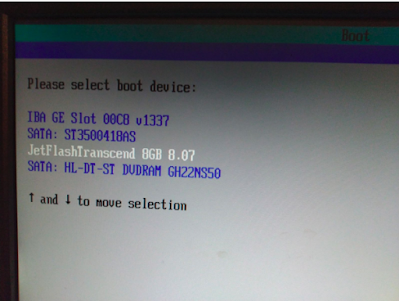
1. Restart your computer/Mac and go to the Boot Menu.​ Select your boot device as USB Flash Drive.

1.Note: Depending on your hardware, the keystroke to enter the boot menu may differ. The typical keys used for various hardware are, but not limited to ‘delete’, ‘enter’, F2, F4, F10 and F12. Look at the splash screen when the computer starts to know the key to enter startup or modify boot order.

2. For Mac, press and hold the Option key to access the startup manager and select the boot device

2. Boot order selection screen -​ will differ on various systems, a typical screen given below:

3.Wait for the exam to load.

4.Click OK at the welcome screen

5. Use the Settings page to make changes​ such as mouse and touchpad speed, region/language, sound levels etc. The hamburger button next to ‘Settings’ provides a list of available keyboard shortcuts

6. Go to Network​ and make sure that your wired internet connection is recognized. Wifi compatibility with the Remote Exam Live USB cannot be guaranteed on all makes of hardware. Wifi may not be listed if the wireless adapter is not recognized by the image. If the Wifi adapter in your computer is recognized, you may be able to connect to a wireless router with the router password. Additional credentials may be needed to connect to your Internet Service Provider. Please note that network performance and stability will depend on various aspects such as the distance between your computer and the wifi router, bandwidth shared with other connected devices etc.
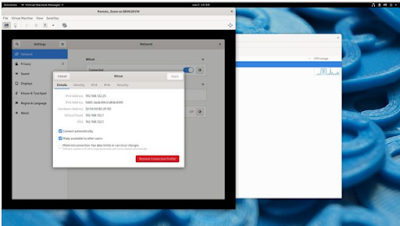

7. After connecting to the internet, close the settings window to connect to the Red Hat Individual Exam Scheduler page

8.Login using your redhat.com account username and password.​ Ensure that this is the same that was used to purchase the exam. 

9.Once inside the Live Environment, run the Compatibility Check​ to verify that your system requirements are met.


10. Raise a live chat with support​ if you have questions during the compatibility test.

11. Return to the main section​ and press the power button of your computer briefly to get the prompt to shut the machine down.

12. Your Exams section​ will display your scheduled exams within the next 24 hours. Please click on this section next to the compatibility check to proceed if you are going to start your exam.

FREQUENTLY ASKED QUESTIONS

Hardware and Bootable Media

Why does it take a very long time to download the Remote Exam Live USB image?

The Remote Exam Live USB image is approximately 2 GB in size. Download speeds can vary depending on a variety of factors such as the available bandwidth and download speed of your internet connection at the time of downloading, number of users connected to the same router, distance from your wifi router, hardware specifications etc.

Fedora Media Writer throws errors while creating a Live USB on Windows 10

There are a few errors seen occasionally when Fedora Media Writer is used to create a Live USB from an iso file in Windows 10. Some of the screenshots given below.


1.The Remote Exam image size is at the borderline of 4GB and hence using an old 4GB thumb drive will cause the above error as the actual size of the image exceeds 4000 Megabytes. Use a drive that is 8 GB or larger in size.

2.Fedora Media Writer saves the ISO to your USB and then reads it back to verify that it gets the same data back as it wrote. If the read does not match the write, FMW will show an error saying ‘Your Disk is Probably Damaged’. This is a very stark message which actually means “Warning – there are inconsistencies between what was written and what was read back”. There are many possible reasons why the read might not match the write and it doesn’t always necessarily mean that the write failed or that the USB will not work. You can ignore this message on an otherwise known good USB and continue using the same.

Click on ‘Cancel’ to exit Fedora Media Writer, reboot your system and try to boot from the USB drive. If it boots successfully to the Remote Exam image, the USB drive and the image on it is fine and can be used for your exam.


1.Clicking on the Retry button and re-attempting the write process may fix the error

2.The above error may also appear if there is an existing Live USB in the disk already. The presence of a Live USB will be detected by FMW and a ‘Restore’ option will be available to format the drive. Click on Restore, finish the format process and reattempt the process of creating a Live USB.

After the exam, how do I reformat my USB drive?

Using Fedora Media Writer: Connect the USB drive to your computer and start Fedora Media Writer. ​You will see a prompt to restore the USB drive to “Factory Settings”: Follow the instructions to restore your USB drive to the Factory Settings
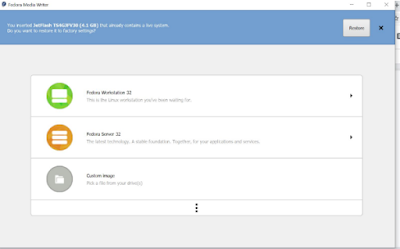


**Note to Windows Users: “Factory Settings” would most likely imply that your USB drive is formatted in the FAT32 file system. FAT32 does not allow transfer of files larger than 4GB and hence most Windows users prefer NTFS.
exFAT handles larger files and is Windows and Mac OS compatible. Hence, you will need to use an additional level of formatting using the Windows format utility.

Can I use a wireless internet connection?
Wifi is not advised. Wherever possible, use a wired internet connection for stability and compatibility. Wifi speeds can vary based on a variety of factors which may have an impact on your exam. The Remote Exam Live USB may not detect all wireless network adapters. If the wifi adapter of your computer is not detected by the Remote Exam Live USB image, then wired internet will be the only option.

How many free USB ports should be available for use during the exam?
You should ideally have a minimum of two USB ports available in a laptop for a bootable USB drive and an external web camera. In the case of a desktop computer, the requirement would be four ports for the following devices: One external webcam, USB drive, keyboard and mouse.

I am unable to download the Remote Exam Live USB image
Your computer and the network you are connecting from must have the necessary privileges and permissions to download files from a third party source. The operating system used must have administrative (Windows) or root/sudo privilege (Linux/Mac). Firewalls and Security restrictions on your network setup might block such downloads. Try a personal computer and/or home network to perform these tasks.

Can I boot to the exam environment using a virtual machine rather than a USB drive?
No. The Remote Exam image must be loaded on a USB drive. Booting off a Virtual Machine is not allowed.

Can I create a bootable live USB by keeping my existing data in the same USB drive?
No. The process of live USB creation will wipe out any existing data and reformat your USB drive as needed.

Is a desktop computer allowed?
Yes

Is an iMac allowed?
Compatibility cannot be guaranteed. If your pre-exam test by booting in to the Remote Exam Live USB works fine, then you can proceed. A few things to note:

iMacs come with wireless keyboard and mouse. Wireless devices may not work.

Detection and stable performance of wifi internet is NOT guaranteed.

Using a wired keyboard and mouse and a wired internet on an iMac should work fine subject to successful pre-exam testing.

One external webcam with at least 1m cable and 90 degree field of view or more is required. The webcam must be focusable from 10 cm to 2 m.

Monday, February 27, 2017

Top 10 reasons why we should use Linux

Linux is different from other operating systems in many important ways. It has become one of the most adopted systems by many users in and around the world. Whether you want to use it for business or any other home operations, Linux offers the most reliable system to adopt.  Most of the world’s largest data centers across the globe use Linux. There are various reasons that answer why should we use Linux, out of which lets see the top ten reasons.

1. Linux is free of charge
Main reason behind Linux power and popularity is its open source nature. The code used to create Linux is free and available to the public to view, edit and for users with the appropriate skills- to contribute to.

2. Linux is more secure
Virus and malware are alien to Linux world. Linux community offers the security fixes for any technical or security threat that encounters. Moreover, Linux users also offer regular kernel updates and regular security patches. In this regard, it is not mandatory for you to have an anti-virus program for your system. Switching to Linux will save you some more as you won’t have to buy an antivirus.

3. Easy to Operate
Ideally, there is no need for intensive training to know how to use the Linux operating system. Besides, it has all the functionality that you look for in Windows. If you are looking for a system that is reliable and can be used by anyone in your business, then this could be the best system to adopt.

4. Compatible with lower end hardware
Most of the other servers do constraint you with a lot of features. Windows 7, 8 and 10 require at least 1GB of RAM. Running Windows 7/8/10 on the minimum configuration will be a real painful experience as it will be extremely slow and almost unusable.
However, Linux is such a lightweight operating system and hence does not constrain you in terms of a memory capacity of your system. It can thus be used by any of your systems.

5. It comes inclusive of drivers
A Windows user must have struggled with drivers. Finding the correct driver for your system is a difficult task. But with Linux, most of these drivers are supported directly by the Linux kernel. This means it is more like plug and play for Linux. And it saves you money as well.

6. Easy Updating Process
Updating windows can be very challenging and stressful. But in Linux you will be regularly notified that updates are available. And these updates include not just system and security updates but available updates for different applications installed. Unlike Windows, you won’t have to wait at shutdown or start time. Updating in desktop Linux is a matter of one click.

7. Software repository
Most of the desktop Linux OS have their own ‘app store’ or ‘software repository’. You can look for any kind of application, libraries at one single place without the need of Googling all over the internet for it. Moreover, the software thus installed will be safe, compatible with your OS and will be getting automatic updates.

8. Linux is speedy
Since Linux is lightweight, it is therefore far much speedy compared to any other operating system. In any business operation or gaming experience, time is the most crucial factor. Linux is the best system to adopt as windows get slower days after days.

9. Linux has a community support
Probably the best thing about Linux is the Linux community. You have a platform where you can share everything with fellow users. If you drop any question you have, you will definitely get its answer from someone. Such is the support of Linux community.

10. Linux features a powerful word processing program

The word processing program in Linux is Libre Office. You can use it for free in editing, opening and send Microsoft documents. You, therefore, save more and more money you could spend buying such a program.

ABOUT AUTHOR:

Naveena K.S. is B.Tech Graduate in Electronics and Communication. She has done her professional studies from College of Engineering Cherthala. Though her specialization is in Electronics and Communication she has a strong liking towards IT. She is very active in technical forums and Medias learning and sharing her views with community. Currently she is doing RHCE programme from IPSR.

Saturday, February 25, 2017

Hybrid Cloud a solution for new digital business

Hybrid cloud deals with mixture of private computing and public computing environment. By allowing workloads to move between private and public clouds as computing needs and costs change, hybrid cloud gives businesses greater flexibility and more data deployment options. Hybrid cloud is attractive because it enables cloud service customers to address their business needs by leveraging the wide ranging capabilities of public cloud service providers – in particular, the low cost and leading-edge functionality available – and at the same time using private cloud deployment for more sensitive applications and data. Interlinking cloud-deployed applications and data with traditional non-cloud enterprise applications and data is also an important part of hybrid cloud deployments.

For designers and developers some of the critical success factors related to hybrid cloud include:

Flexibility: Repartition/deploy elements of a solution based on changing technology services or improved capabilities.

Speed: Quickly leverage new capabilities in their solutions no matter where they are available in the hybrid cloud.

Capacity: Quickly leverage the capacity of off-premises clouds to provide peak support for on-premises systems.

Consistency: Support continuous delivery of applications across the hybrid cloud leveraging common tools and processes.

Agility: Design and develop solutions in such a manner that where they are deployed across a hybrid cloud can be adjusted in a seamless manner.


In terms of IT, businesses today operate at multiple speeds. To meet the challenges of competition and the rapidly evolving market place, businesses need to be agile and innovative, particularly for mobile and web applications used by customers. At the same time, the stable processes and systems that keep the business running cannot be replaced easily and instead evolve at a slower pace. This is two speed IT. One part, the steady speed, delivers enterprise-strength IT services, and the other part, fast speed, enables exploitation of new digital business opportunities. However, success comes through optimizing support for both types of IT. Hybrid cloud can help provide a solution to this need.

About Author:

Prajitha P is a M.Tech student doing her Post Graduate in Signal Processing from Govt. College of Engineering Cherthela. She has a keen interest in mastering latest technologies and is is very active in technical forum and blog writing. Currently she is also doing RHCE along with her Post Graduation.

Wednesday, February 22, 2017

100% pass for CL210 certification examination


Congratulations for a 100% pass rate for CL210 Red Hat Open Stack Administration certification exam held at IPSR Cochin International Center on 14th Feb 2017.
A special appreciation to the training faculty members for their efforts in making this possible.


CL210 course teaches system administrators how to implement a cloud-computing environment using Red Hat® OpenStack® Platform, including installation, configuration, and maintenance.

Sunday, February 5, 2017

100% pass for CL210 certification examination

Congratulations for a 100% pass for CL210 held at IPSR Thiruvanathapuram on 23rd Jan 2017. 

Applause to Chandu Rajan who is a System Engineer at Al Falak System Consulting and Solutions in the UAE and Vipin Kumar who is a System Administrator for IPSR Solutions for getting full marks in the exam.  A commendable performance by all participants for scoring above 94% in the exam and a special appreciation to the training faculty members for their efforts in making this possible.

CL210 course teaches system administrators how to implement a cloud-computing environment using Red Hat® OpenStack® Platform, including installation, configuration, and maintenance.

Monday, January 30, 2017

DevOps: the movement revolutionizing the Software Industry

In the current market scenario, DevOps, a term which can be described as a mix of Development and Operations, isn’t exactly unheard of  in the world of Software Development (It’s been around for 7 years).  It can be described as an approach  that lays stress on collaboration between the development and operations wings of an organization,  adopted to optimize the delivery of software and also improving the production cycle rate.

As a term it was coined by Patrick Deboise, a system administrator, during the “DevOpsDays” events organized by him in Belgium in 2009. In the same year, John Allspaw’s made a presentation on “10+ Deploys per Day: Dev and Ops Cooperation”       at the Velocity 2009 conference.        Eric Ries’ work “The Lean Startup”, the 451 Group’s report “The Rise of DevOps” in 2010 and various other mentions eventually made this methodology popular. This approach emphasizes closer cooperation between the Development and Operations departments. Though it bears some semblance  to the Agile Software Development model, they are not the same. The usage of DevOps will help an organization to produce higher quality software faster. Automation plays a major role in DevOps, and this, aids in the target of faster delivery of the product, as well as ensuring its quality.

Through this method of cooperation, an organization gains continous, faster delivery of products or services. DevOps can also be considered not just as an approach but also a movement which can have various attributes such as a culture, an emphasis on automation, which is a necessary pre-requisite to obtain an immediate response and ways to share new, innovative thinking and strategies.  It can be seen as an improvement to the existing agile methodology of software development. One result was that the operations unit of a technological organization functioned as a seperate unit while the programming,testing along with the business units were brought in line. In DevOps, with its increased focus on operations, Agile methods are to be applied on this unit.

DevOps has grown popular as a result of the software industry’s frustration with the existing software delivery process which are becoming expensive with errors being part of the process. This unproductivity has led to its adoption. Apart from its collaborative aspect, DevOps also depends on continuous feedback for better quality of products at every stage of software development. Automation in product builds and testing are more emphasized than ever. Technologies such as cloud and development on the mobile platform are also well-known for adopting this approach.

RedHat in its whitepaper “Accelerate Your Business with DevOps” by Gordon Haff has made a thrust for the adoption of DevOps, ‘citing the speed and flexibility with which new features are delivered’.  The whitepaper talks of DevOps as instilling a “culture of collaboration”, automation for accelerating application delivery and the building of a dynamic software platform. The whitepaper also stresses on the aspect of automation as well .

Red Hat also, as part of its focus on DevOps, offers a RHCA certification based on it namely Red Hat Certified Architect (RHCA): DevOps, with Red Hat Certified Engineer (RHCE) or Red Hat Certified Developer as necessary prerequisites. Red Hat’s website defines it as someone “who has attained Red Hat’s highest level of certification, proving their skills and knowledge in technologies and practices that can accelerate the process of moving applications and updates from development through the build and test processes and on to production”.  

About Author:

Mr. Thomas Mathew is an IT professional with MSc IT from Amritha School of Arts & Science Cochin. He has a deep passion in system administration. Mr. Thomas is very active in technical forums and blog and love sharing information and views in the media. At present he is doing RHCE (Fast Track) from IPSR.

Tuesday, December 13, 2016

100% pass on CL210 Red Hat Open Stack Administration Exam


Congratulations, yet again for a cracking 100% Pass rate by the participants who took the EX210 Exam on 09 Dec 2016 at IPSR International Center Cochin. Hats off to the training faculty team for their continuous efforts.

<<<< Click here for more >>>>


Saturday, December 10, 2016

DO 407 in progress at IPSR International Centre

The open batch DO 407 (Automation with Ansible) is progressing at IPSR international Centre, Cochin.The sessions are lead by Mr Amal Mathai, Corporate trainer with Red Hat. The entrepreneurs and team leaders from various leading IT companies are participating in this scheduled batch....read more.

Friday, December 9, 2016

IPSR hits another 100% Pass Rate in EX318

Congratulations to all candidates who passed the EX318 held on 03 Dec 2016 at IPSR International Center Cochin giving the course a 100% pass rate. A special salute to the training faculty team which put in their effort to get the excellent result.

Click to read more ......

Sunday, December 4, 2016

Red Hat Open Shift administration (DO 280) @ IPSR

Red Hat Open Shift administration (DO 280) led by Mr. Daleep Bais trainer with Red Hat progresses at IPSR international centre. For more details read

Thursday, February 4, 2016

Promulgation of the hottest job skills 2015 – 16


Cloud and distributed computing is now the most vibrant opportunity among the varied IT and IT enabled skills that gets hired by employers in India. This was revealed by Professional networking website LinkedIn in a survey on the most potential Job skills that enabled a job seeking aspirant to achieve the best job in 2015. Sohan Murthy, data analysis Linkedin said “We noticed that companies were still recruiting and hiring for these skills well into the final months of 2015, so we expect these skills will remain in-demand in the early part of 2016.”
Promulgation of the hottest and potential job skills on the lines of generalization from data analysis results from Linkedin has raised possibilities of the top rated skills to continue on demand throughout 2016. The trend analysis on placement data from various placement gateways revealed that cloud computing, Storage System ManagementNetworking and Information Security, Virtualization, and Max, Linux and Unix System has made a good deal towards the end of 2015 and continues its trend in the opening of 2016.
Incredibly, the huge scores in academics alone doesn’t seem to be pivotal criteria in making a successful deal in placement. Excellence in professional and technical skills in the lines with the new trends and industrial requirement will serve as a better prelude in steering you to success. So guys get going but set your sail in the right direction.
Read More

Tuesday, February 2, 2016

RHCE Batch Schedule - February 1st and 2nd Week

Google edifice open source hybrid cloud powered with Red Hat open shift


The technological flare-ups in the most sought open shift services by RedHat opens a new chapter by the materialization of the steadfast container service which will be made available on Google’s cloud platform. Open source hybrid cloud application was initially introduced on AMAZON and now the technology giants Google and RedHat join hands to set a gorgeous open source hybrid cloud Services in Google cloud platform
A diplomatic alliance widening up between the two top players Google and RedHat is hyping multiple benefits to the tech world from their association, including the complementary relationship between Kubernetes and OpenShift on a win-win basis. In majority of the cloud platforms with containers technology Kubernetes is the most powerful system developed by Google, for managing containerized applications in a clustered environment. However, commentators have noted that RedHat is in the second contributor towards that project ranking next to Google.
Adding to the initiatives, the two are keen to go ahead with developing Google Cloud Bigtable and Google Cloud SQL, a model that could aid to make a superior use of data by providing access to potential GCP services.
Another move in their association is to aid Google’s project on what volume of open source hybrid cloud environment built on container technology. The component absent from the stack is the private cloud component. The Google will never figure the item itself so the company by itself will get to third party with skill sets in that front.
The tech lover now is keen in their heels to experience the magic of open shift dedicated on Google cloud platform.

Saturday, December 26, 2015

COE Exam Results on 14/12/2015


NameCertificationModule
Sassi Ben AmmarRHCE Open stackEX 310
Vasilii AngapovRHCE Open stackEX 310
Sassi Ben AmmarRHCSA Open StackEX 210
Vasilii AngapovRHCSA Open StackEX 210
Akhila RHCSA Open StackEX 210
Aby AntonyRHCSA Open StackEX 210
Shoukath AliRHCSA Open StackEX 210
Rahul KrishnanRHCVAEX 318

Microsoft with huge requirement of Linux professionals

microsoftlovelinux

Gone are the days when Microsoft was at war with Linux and the whole of free and open-source software movement. The tech giant now has narrowly slimmed down the rivalry, outstanding against Linux, the most successful competitor to windows. Mr. Satya Nadella, CEO, Microsoft and Mr. Mark Russinovich, CTO of Microsoft Azure have endorsed this sensational remark “Microsoft loves Linux” on the changed outlook of Microsoft to Linux in many occasions.

 Addressing a conference at Raleigh, North Carolina, Mr. Mark Russinovich remarked that “If you’re a Linux or open source developer, Microsoft wants to work with you, and maybe even hire you.” Also he added to 1,700 person crowd of open source and Linux coders assembled there to “Pass your resumes up,” that there are nearly about 500 job openings... Read more

For more details on Linux training & certification, please visit:  //www.ipsr.edu.in/red-hat/red-hat-linux-training.html


Saturday, December 19, 2015

RHCE and COE Fast Track Course schedules @ Cochin December 2015 - February 2016

RHCE January 4 - January 16
EX200 & EX300 January 18


RHCE January 18 - January 30
EX200 & EX300 February 1


RHCE February 1 - February 13
EX200 & EX300 February 15


Certificate Of Expertise Modules


CL210 December 21 - December 23
EX210 December 31


CL210 December 28 - December 29
EX210 December 31


JB248 January 1 - January 5
EX248 January 7


RH413 January 8 - January 12
EX413 January 14


RH318 January 15 - January 19
EX318 February 1


CL210 January 20 - January 23 2016
CL310 January 25 - January 29 2016


EX210 EX310 February 2


RH236 February 4 - February 5
EX236 February 8


RH318 February 9 - February 12
EX318 February 15


CL210 February 16 - February 19
CL310 February 20 - February 24


EX210 EX310 February 28


RH436 February 29 - March 3
EX436 March 4


Course Schedules at IPSR  

Software and Networking courses at IPSR


Wednesday, December 9, 2015

RHCE in Red Hat Open Stack (CL310) goes live at ipsr solutions ltd.


December 8, 2015, Kochi – ipsr solutions ltd. today defines a new dimension to their training delivery by launching the RHCE in Red Hat Open Stack (CL310). The program goes live from December 9 2015, extending up until December 12, 2015 at ipsr International, Kochi.
Having been an authorized and loyal training partner of Red Hat Inc. since 2003, this effort clearly portrays their passion and commitment towards serving the industry with latest technologies also marking their efforts to equally help support Red Hat and customers of Red Hat products. Facilitating Cloud Training to the core, this is sure to take IPSR‘s interest into making available Cloud certification tracks, certainly to a new level, not to mention their successful delivery run with the RHCSA in Red Hat Open Stack (CL210) for over an year. More

Sunday, November 29, 2015

Stronger together - RHCSA they made it !!!!!

MCA Students of Marian College Kuttikanam - Ajay Paul, Anoop S.P, Ben S Mukkattil, Chippy Joseph, Geo Domnic, K. S Midhun Krishna, Maxin John, Richu Varghese, Shone Jacob,   Sinto Antony and  Hrishikesh P. J have certified one of the most sought and on demand certification RHCSA
Dr. Mendus Jacob, CEO, ipsr solutions ltd., Professor & Director, MCA, Marian College and Mr. Win Mathew John, HOD, MCA, Marian College has congratulated the entire team in this occasion. For more details

Friday, October 16, 2015

IPSR witnessed the highest number of Red Hat Linux certifications during the month of September 2015

34 Cloud certifications in 30 days!!! 


September 2015, climate of Kerala was mostly cloudy, at IPSR International Centre witnessed a pleasant weather with cloud technologies and it rained heavily with cloud certifications and the entire campus was drenched in success where 34 novice red hat cloud engineers bloomed at IPSRian terrain. 
IPSR is proud to announce 34 cloud certifications in just 30 days which is quiet awesome in the history of COE certifications and had never before in the annals of any training Centre worldwide. Once again IPSR excelled as the ideal spot for mastering the hottest technology of any time and now of Cloud computing... Read more

Find out the various Cloud certification courses from here.
For more details on Cloud Computing click here

Follow us on facebook